


The flexibility of a modern co working space offers incredible advantages, but it can also introduce significant IT risks. Are you confident that the shared network is secure enough for your sensitive client data? What happens when a critical device fails, and expert IT help is nowhere in sight? Slow connections and insecure access to company files can quickly erode productivity, turning a dynamic work environment into a source of constant technological anxiety.
It’s time to eliminate these uncertainties. This guide delivers the essential IT strategies and managed services that transform a shared office into a secure, high-performance fortress for your business. You will discover how to implement robust data protection, guarantee reliable access to your network, and ensure your team can operate with the same efficiency and confidence as they would in a traditional corporate headquarters. Let’s build an IT framework that supports your growth, wherever you choose to work.
Key Takeaways
- Understand the unique cybersecurity vulnerabilities inherent in shared networks and physical office environments.
- Learn how to build a multi-layered security defence-from VPNs to endpoint protection-to safeguard your sensitive company data.
- Optimize your team’s efficiency by implementing the right cloud collaboration tools to ensure reliable connectivity within your co working space.
- Recognize the critical difference between basic facility support and the comprehensive, proactive IT management provided by a Managed Service Provider (MSP).
The Hidden IT Risks Lurking in Every Co-Working Space
Co-working spaces offer unparalleled flexibility and networking opportunities, empowering startups and established businesses alike to thrive without the overhead of a traditional office. While the collaborative environment is a major benefit, many businesses overlook the unique technology challenges that come with it. Understanding what is a co-working space from a security perspective reveals that this shared infrastructure can expose your business to significant risks. Too often, these vulnerabilities are ignored until a costly security breach or critical data loss occurs. Protecting your operations starts with recognizing these hidden dangers.
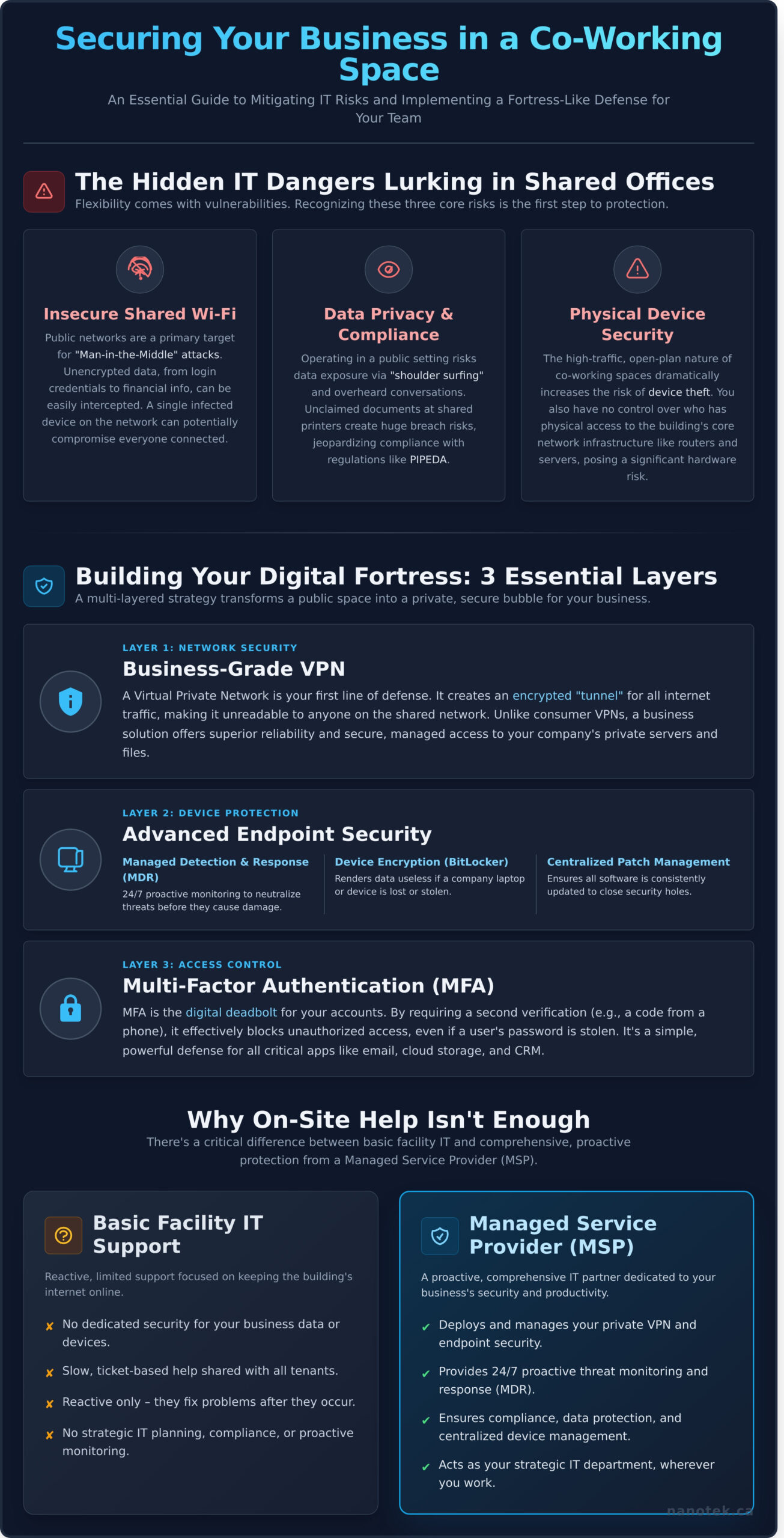
Let’s break down the top three IT risks every business faces in a shared office environment: network, data, and physical security.
The Dangers of Shared Public Wi-Fi
The complimentary Wi-Fi is a core feature of any co working space, but it’s also the most significant vulnerability. These open or easily-accessible networks are prime targets for ‘Man-in-the-Middle’ attacks, where a malicious actor intercepts data between your device and the internet. Without robust encryption, your sensitive information-from login credentials to financial details-can be captured. Furthermore, sharing a network with dozens of other devices means a single infected laptop could potentially compromise everyone connected.
Data Privacy and Compliance Challenges
Operating in a public setting creates serious data privacy hurdles. For businesses handling sensitive information, maintaining compliance with regulations like Canada’s PIPEDA becomes incredibly difficult. Confidential client data can be accidentally exposed on a screen (‘shoulder surfing’) or overheard in conversations. Even simple tasks like printing become risky. Unclaimed documents left at a shared printer or improperly discarded papers can lead to a significant data breach, jeopardizing your reputation and regulatory standing.
Physical Security and Device Management
In a high-traffic, open-plan environment, the risk of physical device theft skyrockets. A momentarily unattended laptop, smartphone, or hard drive can easily be stolen. Beyond personal devices, you have no control over who has physical access to the building’s network infrastructure, such as routers and servers. This lack of control makes managing and securing company-owned hardware a constant challenge, demanding a proactive strategy for off-site device management and data protection.
Essential IT Security Layers for Your Co-Working Team
A shared network in a co working space offers incredible flexibility, but it also introduces significant security vulnerabilities. To operate with confidence, your business needs a multi-layered security strategy that transforms a public environment into a private, secure work bubble for your team. This approach is designed to protect your critical data at every stage: while it’s in transit over the network, while it’s at rest on a hard drive, and on every device that connects to your business.
Understanding the inherent cybersecurity risks in shared workspaces is the first step. The next is implementing robust solutions that build a digital fortress around your operations.
Business-Grade VPN: Your Private Tunnel on a Public Network
A Virtual Private Network (VPN) is your first line of defense. It creates an encrypted “tunnel” for all your internet traffic, making it unreadable to anyone else on the network. While free consumer VPNs exist, a business-grade solution offers superior security, reliability, and the crucial ability to provide secure, managed access to your company’s internal servers and files, no matter where your team members are working.
Endpoint Security: Protecting Your Laptops and Devices
Every laptop, tablet, and smartphone is an “endpoint” and a potential entry point for threats. A modern security strategy goes far beyond basic antivirus. We ensure your devices are fortified with:
- Managed Detection and Response (MDR): Proactive, 24/7 monitoring that detects and neutralizes threats before they can cause damage.
- Device Encryption: Using tools like BitLocker, we encrypt the entire hard drive, rendering data useless if a device is lost or stolen.
- Centralized Patch Management: We ensure all software on all devices is consistently updated, closing security holes that cybercriminals love to exploit.
Multi-Factor Authentication (MFA): A Simple, Powerful Defense
If your passwords are the lock on your digital door, MFA is the deadbolt. It requires a second form of verification-like a code sent to a phone-before granting access. This simple step is one of the most effective ways to prevent unauthorized access, even if a team member’s password is stolen. We help you mandate MFA across all critical business applications, including email, cloud storage, and your CRM, to secure your most valuable assets.
Not sure where to start building your security stack for a co working space? Let us help you design a solution tailored to your needs. Book a free IT consultation.
Boosting Productivity: Cloud Tools and Reliable Connectivity
While robust security is the foundation, productivity is the reason your team comes to work. The flexibility of a co working space demands IT solutions that are equally agile and powerful. Slow, unreliable internet and a lack of centralized tools can quickly undermine the benefits of a shared office. The key is to build a resilient ‘virtual office’ with cloud-based tools that empower your team to collaborate effectively from anywhere, ensuring business continuity no matter the circumstances.
Microsoft 365 & Azure: Your Office in the Cloud
Empower your team with a suite of tools designed for the modern workplace. Microsoft 365 and Azure move your entire infrastructure to the cloud, removing any dependence on physical on-premise servers and providing secure access to everything your team needs. Let us optimize your setup so you can focus on your business.
- Seamless Collaboration: Enable secure, real-time work on documents and projects with integrated apps like Teams, SharePoint, and OneDrive.
- Work from Anywhere: Access all your critical files, data, and applications securely from any internet-connected device, whether you’re in the office, at home, or on the road.
- Scalable Infrastructure: Eliminate the costs and maintenance of physical hardware with a flexible cloud solution that grows with your business.
Managed Data Backup: Your Ultimate Safety Net
The open and dynamic environment of a shared office inherently increases the risk of device theft, loss, or accidental damage. These physical security challenges, highlighted in official government security guidance for co-working spaces, make a robust data backup strategy non-negotiable. An automated, managed backup solution is your ultimate safety net against disaster.
- Automated Protection: Implement a secure, automated cloud backup solution like NanoBackup for all critical company data on laptops, servers, and cloud applications.
- Minimize Downtime: In the event of device failure, theft, or a ransomware attack, ensure you can recover your data quickly and get your team back to work with minimal disruption.
VoIP Phone Systems: Professional Communication Anywhere
Operating from a co working space shouldn’t mean sacrificing a professional image. A modern Voice over IP (VoIP) phone system provides your business with a powerful, flexible communication hub that isn’t tied to a physical desk. Project the image of an established enterprise, no matter where your team is working.
- A Number That Follows You: Use a single, professional business number that can be answered on a desk phone, computer, or mobile app.
- Enterprise-Grade Features: Leverage tools like auto-attendants, call forwarding, and voicemail-to-email transcription to manage calls efficiently and never miss an opportunity.
Let Nanotek build the secure, productive, and resilient IT framework your business needs to thrive. Contact us to learn more.
Why Co-Working IT Support is a Job for a Managed Service Provider (MSP)
While the front desk at your co-working facility can help with Wi-Fi passwords and printer jams, they aren’t equipped to handle critical business IT issues like a server outage, a cybersecurity threat, or a data recovery emergency. For businesses that are serious about growth, relying on basic, shared support is a significant risk. This is the difference between simply using a space and truly thriving in it. A Managed Service Provider (MSP) delivers the expertise and structure of a dedicated in-house IT department without the prohibitive cost.
Proactive Monitoring vs. Reactive Break-Fix
An MSP operates on a proactive model, monitoring your systems 24/7 to identify and resolve potential issues before they become critical failures. This constant vigilance prevents costly downtime-a disaster for agile teams that depend on uninterrupted access to their tools. This stands in stark contrast to the traditional “break-fix” approach, where you only call for help after something has already broken, costing you time, money, and momentum.
Access to a Team of Experts
Partnering with an MSP gives you immediate access to a diverse team of specialists in cybersecurity, cloud infrastructure, networking, and strategic IT planning. Hiring this level of expertise in-house would require a significant investment in multiple salaries, far exceeding the budget of most SMBs. An MSP provides this collective knowledge for a predictable monthly fee, aligning your technology directly with your business goals for scalable growth.
Nanotek’s Support for GTA Businesses
For businesses in the Greater Toronto Area, Nanotek provides the ideal IT partnership. We offer both remote and on-site support, ensuring rapid response times when you need them most. Our solutions are specifically tailored for SMBs operating within a dynamic co working space, addressing the unique challenges of shared infrastructure and flexible teams. Let us manage your IT, so you can focus on driving your business forward. Ready to secure professional, proactive support for your Toronto-based business? Discover our Managed IT Services.
Transform Your Co-Working IT from a Liability to an Asset
The flexibility of a shared office is a major advantage, but it introduces unique IT complexities that can leave your business vulnerable. Relying on basic connectivity is not enough; true security and productivity demand a proactive strategy with robust security layers, optimized cloud tools, and expert oversight. This is too critical to leave to chance or manage with limited resources.
At Nanotek, we specialize in turning these challenges into opportunities. As a trusted partner driving Canadian businesses forward since 1998, our experience is backed by over 650+ successful cloud migrations and 110,000+ resolved support tickets. We build tailored IT solutions that empower your team to work securely and efficiently from any co working space, so you can stop worrying about digital risks and focus on what you do best.
Let us secure your business, so you can focus on growth. Book a consultation.
Frequently Asked Questions
Is the Wi-Fi provided by a co-working space secure enough for my business?
While convenient, the Wi-Fi in a co-working space is a shared network, making it inherently less secure than a private corporate network. It’s not designed to protect sensitive business data from potential threats on the same network. For robust security, you should never rely solely on the provided Wi-Fi. We recommend implementing your own security layers, such as a managed VPN, to encrypt all your company’s internet traffic and protect your critical information from unauthorized access.
Can my business be HIPAA or PIPEDA compliant while operating from a co-working space?
Yes, achieving compliance with regulations like Canada’s PIPEDA is entirely possible, but it requires proactive security measures. Compliance isn’t guaranteed by the space itself; it’s your responsibility. This involves enforcing endpoint encryption on all devices, using a secure business-grade VPN to protect data in transit, and implementing strict access controls for cloud applications. A managed IT partner can implement and document these necessary safeguards to ensure you meet all regulatory requirements.
What’s the difference between using a consumer VPN and a business-grade managed VPN?
A consumer VPN is designed for individual privacy, masking a single user’s IP address. A business-grade managed VPN is a comprehensive security solution built for teams. It offers centralized management to ensure all employees are protected, dedicated servers for stable performance, stronger encryption protocols, and detailed logging for security audits. This allows your IT partner to monitor for threats and ensure consistent security policy enforcement across your entire organization, which a consumer VPN cannot do.
My team is spread across multiple co-working locations. How can an MSP support us?
A Managed Service Provider (MSP) excels at supporting distributed teams. We use centralized management platforms to monitor the health and security of all your devices, no matter their location. We can deploy software updates, enforce security policies, manage cloud access, and provide remote helpdesk support seamlessly. This proactive approach ensures every team member receives consistent, enterprise-level IT support, maintaining productivity and security across all your co-working space locations.
How do you provide IT support if my employees are not in a central office?
We provide comprehensive remote support through a suite of advanced tools. Our process begins with a centralized helpdesk system where users can submit tickets via phone, email, or a dedicated portal. Our technicians then use secure remote access software to troubleshoot issues directly on the employee’s computer. Paired with proactive monitoring that often identifies problems before they impact users, this system ensures your team receives fast, effective support wherever they choose to work.
What is the first IT security step I should take when moving into a co-working space?
Your first and most critical step is to secure your internet connection. Before connecting to the main Wi-Fi network for any business-critical work, you must establish a secure tunnel for your data. This means deploying a business-grade VPN on all company devices. This single action encrypts your traffic, making it unreadable to others on the shared network. This foundational step protects your data from day one and is the cornerstone of a secure setup in a shared environment.